Sunday, 22 November 2015

So what is setup mode?

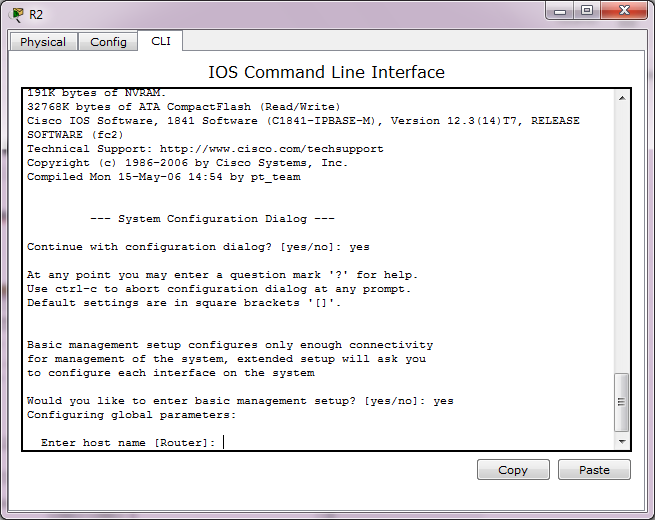
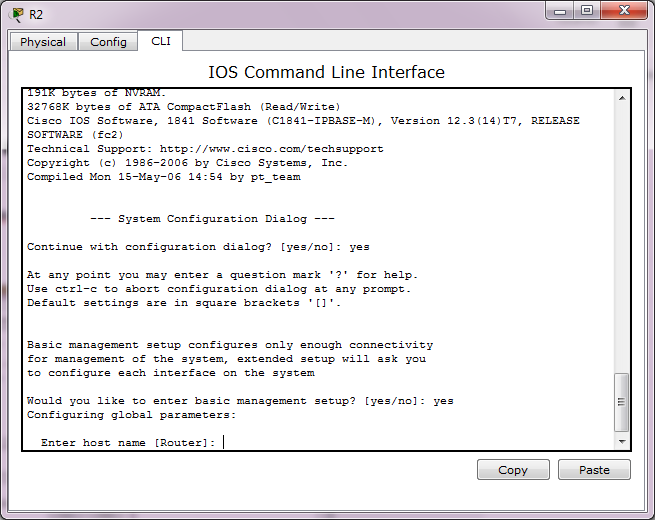
Setup mode is available when a router is started for the first time. Like this below:

Picture 1


So what for?

To provide a basic configuration for the router. Packet Tracer supports only basic management setup, which limits you to configuring only a single interface that can connect to a management system that will supply the remainder of the configuration. Router R2 is an existing router that has been added to the network. We will clear any existing configuration and use setup mode to connect it to router R1.

So what can we do in setup mode?

  • Confirm the use of the configuration dialog by entering yes.
  • Enter basic management setup by entering yes (this is the only option supported by Packet Tracer).
  • Enter R2 for the host name.
  • Enter class for the enable secret.
  • Enter cisco for the enable password.
  • Enter cisco for the virtual terminal password.
  • Enter FastEthernet0/0 for the interface name used to connect to the management network.
  • Confirm the configuration of IP on the interface.
  • Enter 192.168.2.2 for the interface IP address.
  • Accept the default subnet mask.
  • Accept the default to save this configuration to nvram and exit.
After you entered picture 1 with 'yes', you will get this picture:

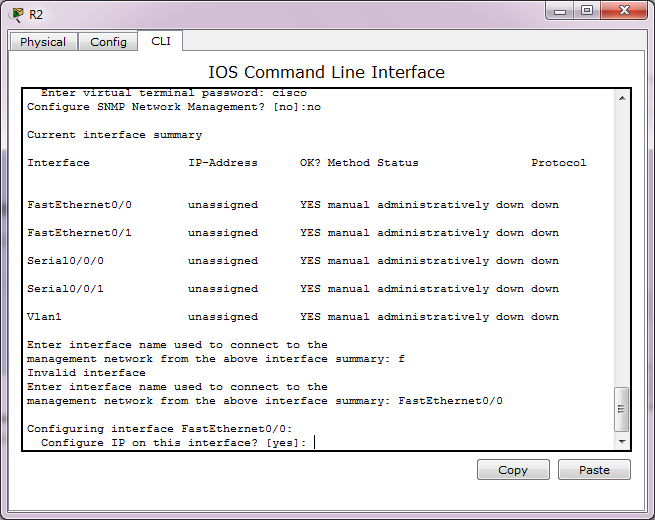
Picture 2
 And after you enter picture 2 with 'yes' you will get this picture below:

Picture 3


Picture 4

Picture 5

Picture 6

Picture 8

Picture 9

Picture 10

Picture 11

Picture 12

Picture 13


Saturday, 21 November 2015

Proper connection test

So what is proper connection test?

Routing loops

Causing you can't ping / telnet and when you do traceroute from PC its like this below:


So what is the final cause of this problem? It is the misconfigured static route within two router or within a pair of router.

Friday, 20 November 2015

You can confirm whether it's there or not by doing the following:

Click on the Start button
Type 'disk manage' in search field
Click on "Create and format hard disk partitions" in search results
Look for anything that says "Recovery" or "OEM" partition in the Disk Management window

How to summerize address

How can I use interfaces loopback to summerize 2 or more network or subnet address?

We can use interface loopback to summerize 2 or more network or subnet address that been given to us to summerize.

Ok, for  you want to summerize these 3 subnetwork addresses:
172.30.1.0/24
172.30.2.0/24
172.30.3.0/24

First, assign each interfaces
R1(config)#int lo0
R1(config-if)# ip address 172.30.1.1 255.255.255.0
R1(config)#int lo1
R1(config-if)# ip address 172.30.2.1 255.255.255.0
R1(config-if)# int lo2
R1(config-if)# ip address 172.30.3.1 255.255.255.0

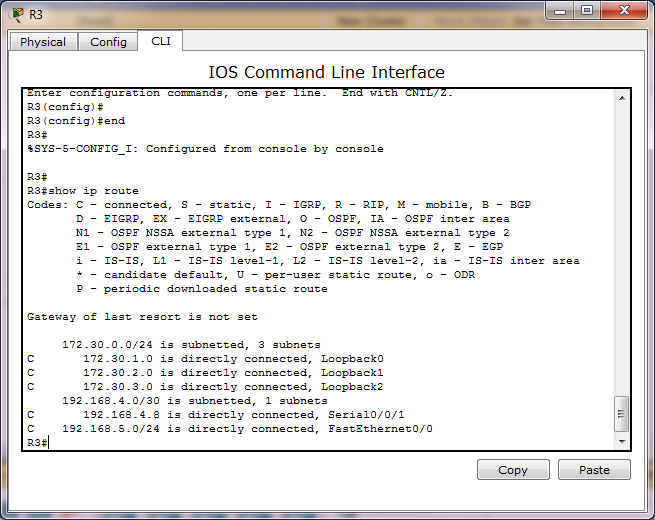
and then show ip route, like below:


Thursday, 19 November 2015

RIP

Lets make all of our router's network databases is same or synchronized and let RIP chooses what better path.

Specifying the network:
1. For each router that want to RIP process routing, configure their directly-connected network just at their classful boundary. No use if you define them at their classless address. Like below:
R1(config)# router rip
R1(config-router)# network 192.168.1.0
R1(config-router)# network 192.168.2.0

Configure RIP's passive interface:
1. For interfaces in each router, define what interface that should be blocked from sending RIP's packet a.k.a don't participate in sending packet of RIP update about network update. So we continue/add our previous config above with below:
R1(config-router)#passive-interface f0/0

But before we add that config/command, we need to show ip protocols, like below:

R1#show ip protocols
Routing Protocol is "rip"
Sending updates every 30 seconds, next due in 26 seconds
Invalid after 180 seconds, hold down 180, flushed after 240
Outgoing update filter list for all interfaces is not set
Incoming update filter list for all interfaces is not set
Redistributing: rip
Default version control: send version 1, receive any version
  Interface             Send  Recv  Triggered RIP  Key-chain
  FastEthernet0/0       1     2 1  
  Serial0/0/0           1     2 1  
Automatic network summarization is in effect
Maximum path: 4
Routing for Networks:
    192.168.1.0
    192.168.2.0
Passive Interface(s):
Routing Information Sources:
    Gateway         Distance      Last Update
    192.168.2.2          120      00:00:18
Distance: (default is 120)

And now assign:
R1(config-router)# passive-interface fa0/0


And show ip protocols again, like below:
R1#show ip protocols
Routing Protocol is "rip"
Sending updates every 30 seconds, next due in 18 seconds
Invalid after 180 seconds, hold down 180, flushed after 240
Outgoing update filter list for all interfaces is not set
Incoming update filter list for all interfaces is not set
Redistributing: rip
Default version control: send version 1, receive any version
  Interface             Send  Recv  Triggered RIP  Key-chain
  Serial0/0/0           1     2 1  
Automatic network summarization is in effect
Maximum path: 4
Routing for Networks:
    192.168.1.0
    192.168.2.0
Passive Interface(s):
    FastEthernet0/0
Routing Information Sources:
    Gateway         Distance      Last Update
    192.168.2.2          120      00:00:00
Distance: (default is 120)

Notice that now FastEthernet0/0 is gone from interface list (list of interface that participate in RIP routing protocol a.k.a active interfaces).

Watch for automatic-summerization.
This is the hardest part to understand with RIPv1. So watch it.
Discontiguos network means is not using subnets of one major network.
Contiguous networks means is using subnets of one major network.

RIP isn't good/better at discontiguos network.

If your networks is inside/using one same major network of IP address, then RIPv1 is good to go. Like this:
172.16.0.0/19
172.16.32.0/19
172.16.64.0/29
172.16.96.0/29
172.16.128.0/29


But if your networks isn't inside/using one same major network, then RIPv1 is wreck/error/fail. For instance like this:
172.16.0.0/19
172.16.32.0/19
172.16.64.0/19
192.168.1.0/24
192.168.2.0/24

I even made a quiz/contest, who able to make above network work with RIPv1 I will give IDR 100.000.

Or, you can use discontiguous networks, but you need to arrange the placement of those networks carefully. Or, just don't use subnets with RIPv1. What I mean is use classful address, don't do subnetting.

Another solution to RIPv1 is using really different major network, like below:
192.168.1.0/24
192.168.2.0/24
192.168.3.0/24
192.168.4.0/24
192.168.5.0/24

While, RIPv2 have 2 options, RIPv1 have 1. Poor RIPv1.

Everytime you given a topology that contains:

Ok. Thats it for automatic summerization. Our next guest is propagating default-route.

Propagating default-route

If you have a router that have an internet connection then that router is a what-we-call a boundary-router.

To tell a router to advertises its default-route is simple. Just use "default-information originate" inside the mode of router RIP configuration mode. Like below:
R1(config)# router rip
R1(config-router)# default-information originate

NTP


Lets make all our LAN's network-devices, PCs or SmartTV's time or clock or watches is same or synchronized and keep it same or synchronized until forever.
In essence, in your LAN, dedicates a/one device as a NTP master and other devices in your LAN as client NTP.

Your-LAN NTP master cling to outside/public/internet's NTP master and your-LAN client NTP cling into your-LAN NTP master. Thats it.

So, for our LAN first we define R1 as our dedicated NTP master that serve the rest of our LAN's devices as follows:
R1#config terminal
R1(config)# ntp server time.microsoft.com

You can choose your own preferred NTP server by the way. You can just google for it or you can obtain a list of publicly accessible NTP servers here: www.ntp.org.

As for now, you can see that R1 is commanded to use outside's/internet's time server as its time/ntp server that is: time.microsoft.com in our case. You need internet connection to be able to connect to time.microsoft.com server and off course your router need to have dns server address and also able to ping the name: time.microsoft.com. If you don't use dns server, you can directly type the NTP server's in IP address format. For instance:
R1(config)#ntp server 192.168.1.1
R1(config)#

So now lets check its time, as follows:

R1#show clock
07:53:57.922 UTC Thu Nov 19 2015

Thats still not correct! What we missing is 'setting up the timezone of our own', so now lets add below command:
R1(config)# clock timezone INDONESIA +7

and then show clock again, as follows:
R1#show clock
15:05:49.860 INDONES Thu Nov 19 2015

Now its match. Indeed it is 3 PM now.

Congratulations..

NTP can be used to setting the clock of Cisco devices. But, not just Cisco devices, your Windows or Linux devices can also use NTP to set up their clock.

You can use a command like: show ntp associations, but whats that good for you is just wether the router have been synchronized or not with the ntp outside. Like below:

R1#show ntp associations

  address         ref clock       st   when   poll reach  delay  offset   disp
*~104.209.134.106 129.6.15.30      2     38     64   377 269.45  17.997 18.285
+~103.31.248.249  203.160.128.3    3     29     64   377 51.373  39.953  2.909
 * sys.peer, # selected, + candidate, - outlyer, x falseticker, ~ configured

Right at the very bottom is  * sys.peer, # selected, + candidate, - outlyer, x falseticker, ~ configured.

R1#show ntp status
Clock is synchronized, stratum 3, reference is 104.209.134.10
nominal freq is 250.0000 Hz, actual freq is 249.9997 Hz, precision is 2**28
reference time is D9F80E87.6F85B6AD (16:01:59.435 INDONES Thu Nov 19 2015)
clock offset is 23.9173 msec, root delay is 300.02 msec
root dispersion is 115.20 msec, peer dispersion is 20.16 msec
loopfilter state is 'CTRL' (Normal Controlled Loop), drift is 0.000001037 s/s
system poll interval is 64, last update was 301 sec ago.

R1#show ntp status
Clock is unsynchronized, stratum 16, no reference clock
nominal freq is 250.0000 Hz, actual freq is 249.9997 Hz, precision is 2**28
reference time is D9F80E87.6F85B6AD (16:01:59.435 INDONES Thu Nov 19 2015)
clock offset is 0.0000 msec, root delay is 0.00 msec
root dispersion is 0.50 msec, peer dispersion is 0.00 msec
loopfilter state is 'CTRL' (Normal Controlled Loop), drift is 0.000001037 s/s
system poll interval is 64, last update was 398 sec ago.